
In today’s fast-paced digital landscape, manual marketing tasks eat away at creative time. By using workflow automation platforms like Make.com and n8n, digital marketing agencies can connect their favorite tools—including generative AI models like Claude Pro—to completely hands-off their content pipelines.
Core Automation Use Cases in Digital Marketing
Automation replaces repetitive processes with seamless workflows. Here are the top ways to implement it:
- Social Media Multi-Posting: Instantly share new content across Instagram, Facebook, and LinkedIn simultaneously from a single trigger.
- Lead Generation Pipelines: Automatically capture website form submissions and route them directly into your CRM.
- Email Marketing Sequences: Trigger specific onboarding or re-engagement emails based on distinct user behaviors.
- Performance Reporting: Aggregate weekly analytics data from Google Analytics and social channels directly into shared spreadsheets or Slack channels.
Directly Comparative Overview: Make.com vs. n8n
| Feature | Make.com | n8n |
|---|---|---|
| Interface | Visual drag-and-drop builder with intuitive nodes. | Node-based editor with native code flexibility (JavaScript/Python). |
| Hosting | Primarily cloud-hosted (SaaS). | Self-hosted (open-fair-code) or cloud-hosted options. |
| Pricing Model | Tiered pricing based on the total number of operations executed. | Tiered pricing based on active workflows/executions, or free self-hosting. |
| Best For | Marketers looking for a fast, user-friendly setup with no code. | Technical teams and developers wanting advanced logic and data privacy. |
Step-by-Step Blueprint: Cross-Channel Social Automation with Claude Pro
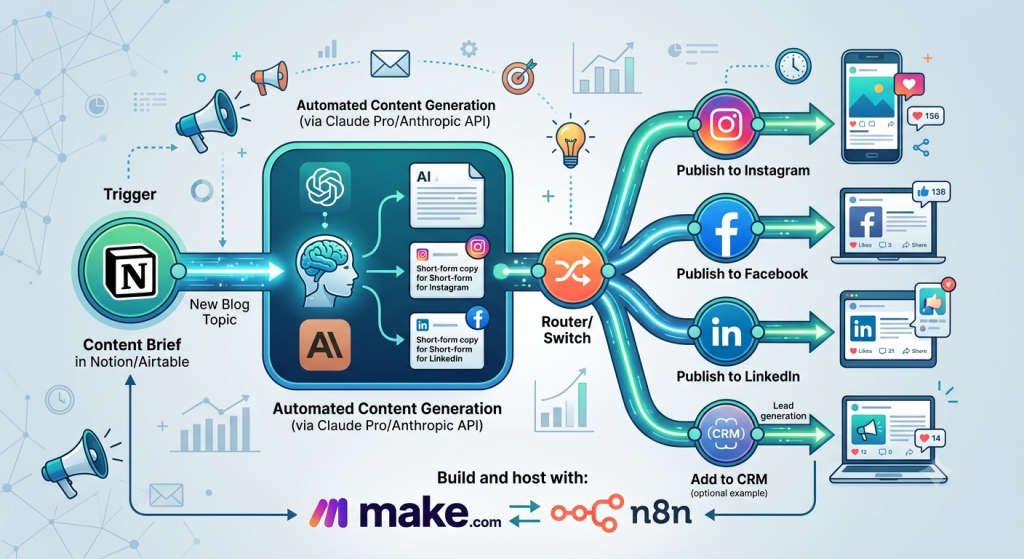
To build a complete content generation and cross-channel publishing system using Make.com or n8n, follow these sequential steps:
- Set Up the Trigger: Connect a database like Notion or Airtable where you drop new blog topics or raw content briefs.
- Integrate Claude Pro (Anthropic API): Feed the topic into an Anthropic API module. Instruct Claude with specific system prompts to write an engaging blog draft and generate individual, tailored copy optimized for Instagram, Facebook, and LinkedIn.
- Branch the Workflow: Use a router or switch node to split the single automation path into multiple channel-specific directions.
- Publish to Social Media: Connect your Facebook Pages, Instagram Business, and LinkedIn Company Page modules to automatically post the respective text generated by Claude.
- Update Status: End the workflow by updating the original database status from “In Progress” to “Published.”
Would you like me to write the detailed system prompt for Claude Pro to generate the social media posts, or should I create a step-by-step technical guide for configuring the make.com router?